Showing posts with label Bluetooth. Show all posts

Thursday, March 8, 2012

Apple iPad 3 Wi-Fi Specifications


Update 15-March-2012 - As I mentioned, I'd have more information once iFixit performed their teardown of the new unit. Well they're doing it right now... Wi-Fi, Bluetooth, FM chipset - confirmed it's a Broadcom BCM4330. Sadly, it doesn't look like 40MHz support will be possible :(


So, Apple announced "the new iPad" yesterday (aka - the iPad 3). I've done some digging on it at the FCC for Wi-Fi specifications and here is what I've found out.

First, the new iPad models fall under the following FCC IDs:
  • Wi-Fi Only FCC ID is BCGA1416
  • Verizon LTE FCC ID is BCGA1403
  • AT&T LTE FCC ID is BCGA1430

I'm only interested in the Wi-Fi specs, so I've looked up the Wi-Fi only model (A1416) at the FCC OET Equipment Authorization database. It's worth noting that much of the Bluetooth and Wi-Fi testing and certification was performed on the Verizon LTE model (A1403) and covers the other two models as well.

Wi-Fi and Bluetooth Capabilities
From the FCC test reports we can gather the following certification details:

  • 1x1:1 MIMO (1 spatial stream)
  • 20 MHz wide channels only
  • 65 Mbps max raw data rate (likely)
  • Bluetooth 4.0 including Low Energy mode and High Speed alternate MAC/PHY (leveraging the Wi-Fi chipset to offload large data transfer)

The combo Wi-Fi and Bluetooth chipset used by the iPad 3 is definitely NOT the same Broadcom chip used in the iPad 2 and iPhone 4 (which used the Broadcom BCM43291HKUBC). We won't know for sure what chipset is being used because the FCC internal photos are currently marked "Confidential" until 05-Aug-2012. However, once iPad 3 devices start shipping on 16-Mar there should be an iFixit teardown to give us insight.

My guess is that there are significant hardware improvements under the hood, which Apple may not be leveraging at time of initial release but may drop an update later on down the road. We know for sure from the FCC test reports that it support Bluetooth 4.0, which should be a major improvement over 2.1 + EDR found in the iPad 2. If Apple is using another Broadcom combo chip, which is highly likely, it could be the BCM4334 which is designed for smartphones and tablets. Broadcom product literature even includes very "Apple-esque" verbiage around highly mobile devices and push-email. This would be an intriguing choice since that chip offers single-stream 802.11n, dual-band operation, and 40MHz wide channels. Broadcom also lists concurrent dual-band capability for Wi-Fi client access on one band while simultaneously using Wi-Fi Direct or Wireless Display on the other band using what they call "advanced switching techniques."

If Apple does drop a software update at a later date for the iPad 3, we could see Wi-Fi specs bumped to:
  • 1x1:1 MIMO (1 spatial stream)
  • 40 MHz wide channels
  • Short Guard Interval (SGI) support
  • 150 Mbps max raw data rate
However, this may or may not happen. Support for 40 MHz channels would be a nice upgrade to enhance the product as it ages and keep it relevant. But it could have significant battery life implications which may make Apple hesitant to adopt. Also, SGI support is possible but unlikely since the chipsets used in the iPad 1 and iPad 2 were similarly capable but was not implemented by Apple (as Keith Parsons did an excellent job of analyzing on his blog).

iPad 3 Supported
Frequency Bands
Frequency Bands Supported
Note - All frequency ranges reference center channel frequencies from low to high channel.

Bluetooth:
ISM (2402 - 2480 MHz) - Bluetooth Frequency Hopping (FHSS)
ISM (2402 - 2480 MHz) - Bluetooth 4.0 Low Energy (BT LE)

Wi-Fi:
ISM (2412 - 2462 MHz)
ISM (5745 - 5825 MHz)

UNII-1 (5180 - 5240 MHz)
UNII-2 (5260 - 5320 MHz)
UNII-2 Extended (5500 - 5700 MHz)
UNII-3 (5745 - 5805 MHz)

The good news here is that the iPad will support operation using 20 of 23 available UNII channels. This should help enterprise network administrators plan for infrastructure deployments that can utilize the UNII-2 Extended frequency band. The 3 channels that are disabled (ch 120-128) in the 5600 - 5650 MHz range are disallowed for operation in the U.S. by the FCC DFS regulations due to Terminal Doppler Weather Radar (TDWR) systems.

Administrators have been reluctant to enable use of these channels in their networks because few clients have supported it. Enabling it on the APs would therefore result in "black holes" where clients would not be able to connect to the network. However, as more clients support this band administrators should look to verify client compatibility across the range of devices they support and, if possible, enable use of this band for greater Wi-Fi network capacity to meet the growing need for high-density deployments.

Additionally, channel 165 (ISM 5825 MHz) is available for use in the new iPad 3. However, few if any network administrators typically enable support for this channel in their deployments.

Antenna Gain
Here you can see the internal antenna gain in the iPad 3:

iPad 3 Integrated Wi-Fi Antennas

Power Output
Power output varies based on the exact frequency of transmission or channel of operation due to FCC regulations that limit spurious side-band emissions. Therefore, power output is usually lower on frequencies at the lower and upper edges of the bands. For simplicity, I will provide the range of power output values reported by the FCC across each band. For detailed information, see the FCC test reports.

Bluetooth
FHSS - 10.80 to 11.90 dBm
Bluetooth 4.0 Low Energy - 8.70 - 8.90 dBm

Wi-Fi
The Wi-Fi values get even more complicated because of the variations in spectral masks used by different 802.11 physical layer technologies. I've summarized the FCC test results into the following table for easier reference.

iPad 3 Wi-Fi Output Power (Average)

FCC Regulations Update
It appears that in May 2011, the FCC adopted new requirements for client device operation in the UNII-2 and UNII-2 Extended bands with regards to radar detection capabilities (or lack thereof). It reads:

Devices to be approved as UNII clients need to show compliance with the general requirements of Section 15.202, in addition to the technical requirements of Part 15E.  According to the requirements of Section 15.202, a client device must rely on a master device to initiate a network if the client device does not have radar detection capability.  Such a client device cannot initiate, or be configured to initiate, any transmissions including transmissions from probes, beacons or support ad-hoc modes of operation.  The operation of a device as a Group Owner for Wi-Fi Direct in the bands is therefore limited only where it is approved as a master according to the requirements of Section 15.202 (see KDB # 594280).

So, a client device can avoid implementing radar detection as long as the manufacturer certifies that it will not operate in ad-hoc or peer-to-peer mode. The device must only perform passive scanning to find a "master device" (e.g. an access point) that is capable of radar detection and is already operating on the frequency. In addition, this also applies to Wi-Fi Direct operation by the device.

Apple and other device manufacturers are now required to submit a DFS Attestation, similar to the following: 
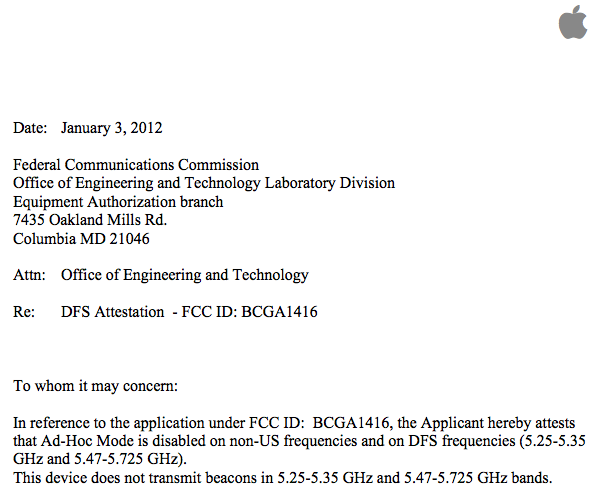
Apple iPad 3 (A1416) DFS Attestation Letter

Conclusion
Although at first glance the iPad 3 appears to be similarly capable as the iPad 2, the underlying hardware could be much more powerful. Whether or not Apple decides to release a software update to unleash greater Wi-Fi transfer speeds at a later date is unknown, but could form the basis for a strategy to keep the iPad 3 unit relevant as a low-end option once the next version of the iPad is released, likely supporting 802.11ac for even greater speeds.

Additionally, the support for DFS channels in both the UNII-2 and UNII-2 Extended bands is a great sign for Wi-Fi networks to enable greater capacity.

Cheers,
Andrew vonNagy

Wednesday, February 22, 2012

Graphic: Comparing Wireless Technology Range and Data Rates

This graphic helps visualize the different use-cases for various wireless technologies by comparing range and data rates.

A few notes:

  • LTE could be included in the same area as WiMax, and could probably be re-named "4G".
  • Wi-Fi will soon approach Gigabit speeds with 802.11ac and 802.11ad and would shift upward in the graphic.


Cheers,
Andrew

Friday, February 3, 2012

Bluetooth That Will Make You Cry

Question: What happens when you put 40 Bluetooth devices in simultaneous operation within 800 sq. feet of each other?

Answer: This...

Spectrum Analysis Capture of 40 Simultaneous Bluetooth Devices

Now think about this on your own: Can you spot the Wi-Fi going on at the same time? No, you say that you can't? Why not? (Please provide your answers in the comments section for this post)

Here's an image of the "baseline" Wi-Fi activity prior to the Bluetooth activity in the same environment. I bet you can spot the Wi-Fi in this one. There's a typical enterprise deployment with APs on channels 1, 6, and 11, plus an iperf performance measurement currently going on across channel 6.


What's Going On Here?
This is a capture of 40 Honeywell Xenon 1902 cordless Bluetooth area-imaging barcode scanners operating at the same time. These units are used in retail environments at checkout registers to provide faster scan rates, ease of mobility, and overall a faster checkout process for customers. The "area-imaging" implies reading of 2D barcodes such as QR codes and such.

Honeywell Xenon 1920 Area-Imaging Cordless Barcode Scanners

Bluetooth is becoming the default communication method for cordless barcode scanners by almost every manufacturer. I did a bit of research on it, and only 2 out of 8 manufacturers of cordless barcode scanners support an alternative to Bluetooth (one used Wi-Fi and another used narrowband at 433 or 910 MHz). But every single one of them provide a Bluetooth option, and it is typically the more prominently displayed option on their websites. I also received information from a good friend, Joel Barrett, that indicates manufacturers are all moving to Bluetooth scanners and support for other options will be phased out. So, if I wanted to choose a different option I could probably get one now, but support would be short-lived and I'd end up having to switch to Bluetooth anyways. Might as well bite the bullet now and figure out how to deploy these in my environment to co-exist [relatively] peacefully with my Wi-Fi network.

Performance Impact
These units are rated as a Class 2 Bluetooth transmitter, meaning they should have a maximum power output of 2.5mW and an estimated range of 10 meters. Sounds nice and low, and one would expect minimal impact to Wi-Fi. But the reality can be far different!

It's important to understand the different impact that Bluetooth can have in an enterprise environment than in a consumer environment. The deployment scenarios can be dramatically different, and a high concentration of Bluetooth devices in a small area directly correlates to decreased performance. Sure, the typical duty cycle of a single Bluetooth device is small. But as Bluetooth device density increases so does Wi-Fi performance impact due to increased CCA busy detection by Wi-Fi devices and increased frame corruption when Bluetooth can't avoid APs on multiple channels. Even if Bluetooth version 1.2 and later capable devices are used that implement adaptive frequency hopping, they cannot avoid interfering with Wi-Fi access points spread out across the entire 2.4GHz frequency band.

In executing Wi-Fi performance testing with these Bluetooth devices our team ran multiple scenarios, changing Bluetooth power levels, pairing status, and scan rates. What we came away with also varied dramatically based on these settings. Our baseline was an 802.11g network with 20 Mbps throughput. The environment is an open-air retail setting at the front register checkout lanes.


Clearly, despite being rated as a Class 2 Bluetooth device, the RF signal was carrying quite far. Luckily, Honeywell has done a good job providing management tools to customize the radio performance of their barcode scanners. By adjusting the power level down we were able to minimize the impacted area as well as the impact to the Wi-Fi network.

What made our situation even more challenging was the desire to deploy VoWiFi around the same time as the cordless barcode scanners in the same environment. Our preference is to use voice handsets that support 5GHz frequency bands, but that may not be possible due to other business considerations on device capabilities and application support (we're still evaluating solutions). So, we ran 2.4GHz voice tests that showed an average 20% frame loss rate when the Bluetooth scanners operated at 10% (0.25mW) and an unacceptable user experience. When the power level was reduced to 1% (0.025mW) the frame loss was much lower and no perceptible voice quality issues could be observed by end-users.

Ultimately, we were able to find a compromise that allowed the use of these cordless barcode scanners while minimizing impact to the Wi-Fi network.

Deployment Considerations
Here are some considerations when deploying Bluetooth in an enterprise environment:
  • Device Selection
    Select Bluetooth devices that are configurable and easy to provision. The device should support modification of all of the settings listed below, and keep those configuration settings across reboots. If a device is factory-reset or the battery dies, it should be able easy to re-apply the custom configuration settings by staff in the field with minimal training and effort.

    Recommendation - Purchase "enterprise-class" Bluetooth devices that allow custom configuration.

  • Device Density
    In general, the more Bluetooth devices operating in a confined area, the more impact to the Wi-Fi network. Pretty simple. Each individual Bluetooth device has minimal impact due to very low duty cycle (airtime used), but as more and more devices are added it linearly increases interference and decreases Wi-Fi performance.

    Recommendation - Minimize Bluetooth device density as much as possible.

  • Power Level
    The Bluetooth transmission power level, especially in dense deployments, can have a dramatic effect on the impact to a Wi-Fi network. In our testing, reducing power levels from 100% (2.5mW) down to 1% (0.025mW) significantly reduced the impact to the Wi-Fi network, and the range provided was still adequate to meet our business needs.

    Recommendation - Reduce Bluetooth transmission power to the lowest setting that still allows reliable functionality for a given deployment scenario.

  • Bluetooth Pairing
    The pairing status of a Bluetooth device can determine how actively the device transmits. A paired device usually transmits much less frequently than an unpaired one. Unpaired devices may constantly search for a base station or partner, often times transmitting very frequently in what many manufacturers call "distress mode". Honeywell also provides a configurable scan timer that adjusts how long an unpaired device will search for its partner. We adjusted this setting down to 3 cycles instead of infinite. It will also scan whenever the trigger is pulled. This minimizes interference in the worst-case scenario that the device gets unpaired.

    Recommendation - Establish sound operational practices to ensure Bluetooth devices remain paired at all times. Additionally, adjust scanning timers down to a reasonable level from defaults.

  • Know Your Environment
    Bluetooth impact will also vary based on the environmental characteristics in which it is deployed. In my situation the impact was significant because an "open-air" environment. But that may not be the case in an office with many more walls and obstacles that prevent RF signal propagation. Also, know your Wi-Fi client device capabilities and applications. If you only use data applications like web surfing and file transfer, Bluetooth may not be a big risk. But if you use real-time applications like voice or streaming video, then it could cause usability issues.

    Recommendation - Understand how Bluetooth impact will vary based on the facility characteristics and applications deployed on the Wi-Fi network.

  • Migrate Wi-Fi to 5GHz
    If you can't mitigate the performance issues with Bluetooth or any other source of interference in the 2.4GHz spectrum, move your clients over to 5GHz. This one is easy to understand, but can be difficult to achieve in practice. Consider the influx of mobile devices that only operate using a single-radio 2.4GHz chipset. What applications will be used on those devices, and what is the implied or defined service level agreement between the network team and business teams?

    Recommendation - Use band steering techniques or different WLAN configurations on the Wi-Fi network to move 5GHz capable clients over to this band.

Andrew's Take
The delivery of business capabilities will always trump non-functional technology requirements (unless your business is technology). As IT professionals we must understand and accept this. Instead of saying "no" to solutions that go against best practices, work to understand the business request and develop a solution that delivers what the business needs. This requires compromise on your part, not every solution can be 100% the best technology. Often times, the best technical solution is NOT the best business solution.

Network administrators should be aware of initiatives to use Bluetooth client devices within their environments. They do not need to block use of these devices outright, but do need to perform proper performance analysis and modify Bluetooth configuration settings to minimize impact to the Wi-Fi network.

This type of scenario also highlights why I prefer to deploy wireless access points with integrated spectrum analysis in my environment. Day-to-day operation of this network requires "always-on" visibility into non-Wi-Fi sources of interference so that I can baseline, trend, and report on network performance. It's also why I prefer a dedicated SpecAn chipset in APs, and am skeptical of 1st-generation Atheros-based solutions that cannot perform concurrent spectrum analysis while serving Wi-Fi clients. They require a dedicated RF / Spectrum mode of operation and have to be taken out of service. I hear that's changing and Atheros solutions can now provide that "always-on" capability, but have yet to see one hands-on or test vendor claims.

Cheers,
Andrew